# Why is my HTML5 package blank in SLS?
*A step-by-step way to find what SLS blocks, fix it inside your files, and test the fix on your own computer before you upload again.*
By lookang · 15 September 2026 · Worked example: an Articulate Storyline 360 course exported as SCORM 1.2, in English, Malay, Chinese and Tamil
I uploaded a Storyline 360 course to SLS as an HTML5 interactive. On my computer it played perfectly. In SLS it showed a white box with a play button and a progress bar. Pressing play did nothing.
The course wasn't broken. SLS runs uploaded packages under stricter rules than an ordinary web page, and my package broke three of them. The browser says exactly which rules were broken; you only need to know where to look. The same method works for any HTML5 package: exports from authoring tools, simulations, or pages you built yourself.
> **In short**
>
> SLS shows your zip inside a locked-down frame on a separate website, `html.learning.moe.edu.sg`. Inside that frame:
>
> - there is no LMS, so a SCORM launch file that waits for one never starts;
> - fonts, audio and video must be real files in your zip — anything embedded as `data:` or fetched from another website is blocked;
> - pop-up dialogs (`alert`, `confirm`, `prompt`) are switched off.
>
> Read the console, fix those things in your files, test with the same rules on your computer, then upload again.
## What the console showed
Trimmed from Chrome's console after my upload. The count is how many times Chrome grouped the same message.
| Count | Console message | What it is |
|---:|---|---|
| | `shortcuts.json?Policy=… Failed to load resource: the server responded with a status of 403 ()` | SLS's own page · ignore |
| | `tinymce.min.js:10 Uncaught TypeError: Cannot read properties of undefined (reading 'get')` | SLS's own page · ignore |
| 54 | `Loading the font '' violates the following Content Security Policy directive: "font-src 'self'". The action has been blocked.` | Fonts blocked |
| 189 | `Loading media from '' violates the following Content Security Policy directive: "media-src 'self'". The action has been blocked.` | Audio and video blocked |
| 40 | `Loading media from 'data:video/mp4;base64,AAAAHGZ0eXBpc29t…' violates the following Content Security Policy directive: "media-src 'self'".` | Audio and video blocked |
| 9 | `Ignored call to 'confirm()'. The document is sandboxed, and the 'allow-modals' keyword is not set.` | Pop-up ignored |
| | `SCORM error: Error - unable to acquire LMS API, content may not play properly and results may not be recorded.` | **The real blocker: no LMS** |
| | `frame.desktop.min.js:2 Uncaught TypeError: Cannot read properties of undefined (reading 'progress')` | Knock-on error |
## Before and after
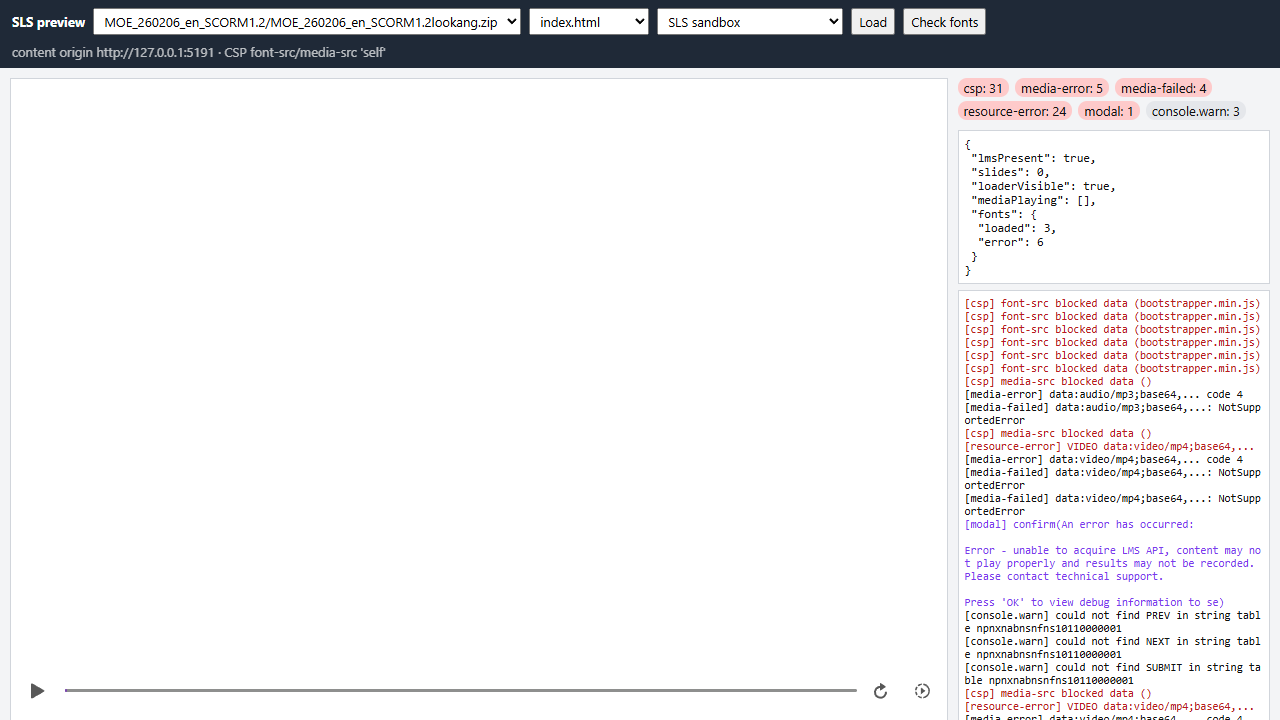
**Before.** The zip as I first uploaded it. No slide loads, 31 requests are blocked, 6 of 9 fonts fail, and the SCORM error sits inside a `confirm()` nobody ever sees.
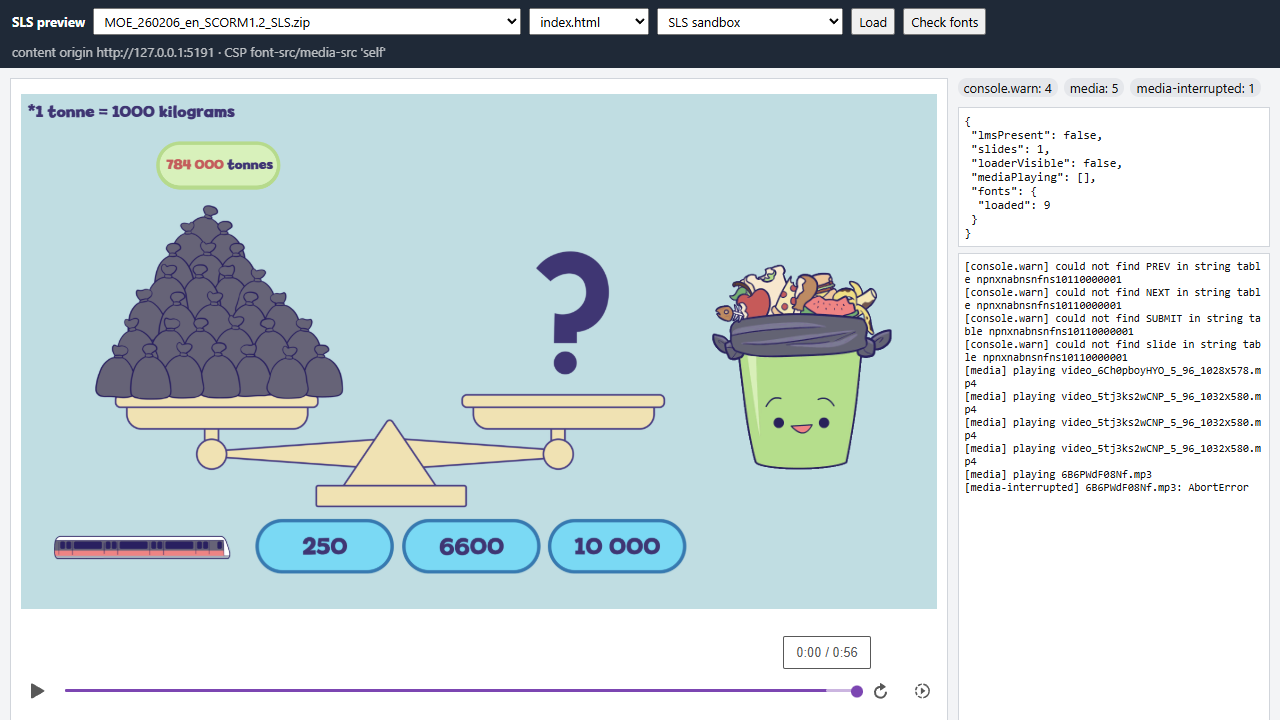
**After.** The fixed zip. The course starts, all 9 fonts load, the narration plays, and nothing is blocked. The one `AbortError` is Storyline pausing its own audio.
Both screenshots come from the local preview in Step 6, which applies SLS's rules on my own computer.
## How SLS runs your zip
Three things decide whether a package runs in SLS.
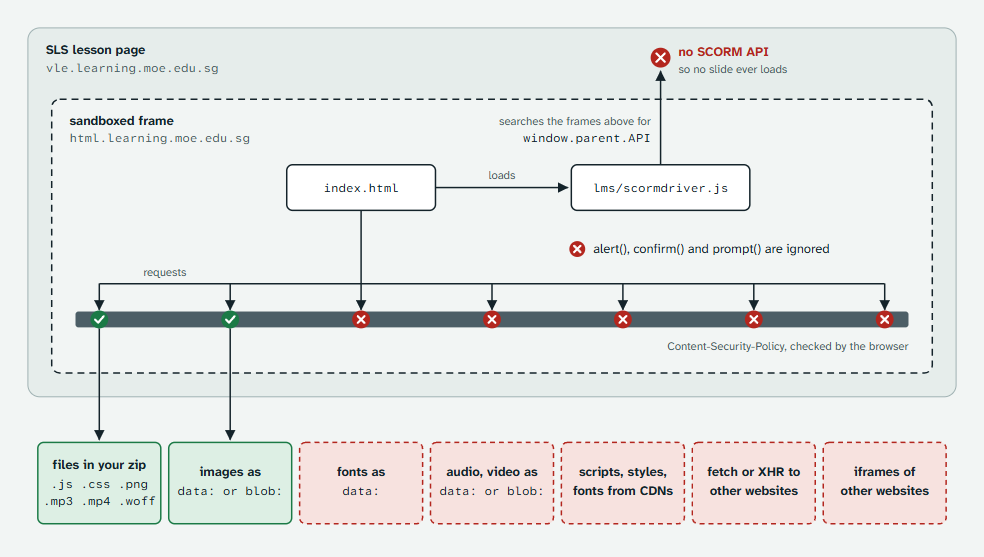
- **A separate website and a sandbox.** Your files are served from `html.learning.moe.edu.sg` and shown in a frame inside the SLS lesson page. The frame has no permission for pop-ups.
- **A Content-Security-Policy.** A header sent with your `index.html` that lists where fonts, media, scripts and data may come from. For fonts and media, the only allowed source is your own zip.
- **No LMS.** An HTML5 interactive isn't launched by an LMS. A package that waits for the SCORM API waits forever.
Seven steps follow: 1–2 find the problem, 3–5 fix it, 6–7 prove it's fixed.
## Step 1: Read the console and sort the messages
Open the SLS page with your interactive and press **F12** (**Cmd+Option+J** on a Mac), then open the **Console** tab. Reload the page so you see messages from the very start.
Sort every red line into one of two piles:
- **SLS's own messages.** They mention SLS files such as `shortcuts.json`, `tinymce.min.js` or `index-….js`. Everyone sees these. Ignore them.
- **Your package's messages.** They mention files from your zip, or the address `html.learning.moe.edu.sg`.
Then match each message about your package to this table.
| If the message contains | It means | Go to |
|---|---|---|
| `unable to acquire LMS API` or `LMSInitialize` | The package was started with its LMS launch file and is waiting for an LMS that isn't there. | Step 3 |
| `"font-src 'self'"` | A font is embedded as `data:` or comes from another website. | Step 5a |
| `"media-src 'self'"` | Audio or video is embedded as `data:` or `blob:`, or comes from another website. | Step 5b |
| `"script-src …"` or `"style-src …"` | A script or stylesheet comes from another website. | Step 5c |
| `"connect-src …"` or `"child-src 'self'"` | The page fetches data from, or frames, another website. | Step 5d |
| `Ignored call to 'alert()'`, `'confirm()'` or `'prompt()'` | The sandbox switched off a pop-up dialog. | Step 5e |
| `Cannot read properties of undefined` | Usually a knock-on error from a line above. Fix those first, then look again. | — |
One message you can safely leave: Storyline tries to send usage statistics to Articulate, and SLS stops it with `Connecting to 'https://metrics.articulate.com/v1/import' violates … "connect-src …"`. It doesn't affect the course. Setting `suppressAnalytics: true` in the launch file removes it.
## Step 2: Open your package on its own and read SLS's rules
The console on an SLS page mixes SLS's messages with yours. Opening your package by itself gives you a clean console with the same rules.
1. In DevTools, open the **Network** tab and reload the page.
2. Type `html.learning` in the filter box. The requests that appear are your files.
3. Click `index.html`, open **Headers**, and scroll to **Response Headers**. The `content-security-policy` header is the rulebook for your package.
4. Right-click `index.html` and choose **Open in new tab**. Your package now runs alone, under the same header.
This is the header SLS sent on 15 September 2026, split one rule per line so it's easier to read:
```
content-security-policy:
script-src 'self' 'unsafe-inline' 'unsafe-eval';
object-src 'self';
font-src 'self';
style-src 'self' 'unsafe-inline';
connect-src 'self' https://api.learning.moe.edu.sg;
img-src 'self' data: blob:;
child-src 'self';
media-src 'self';
default-src 'self';
worker-src 'self' blob:
```
`'self'` means the website your package is served from — in practice, the files inside your zip.
| Rule | Allowed | Blocked, for example |
|---|---|---|
| `font-src 'self'` | Font files in your zip | Fonts embedded as `data:`, Google Fonts, other font services |
| `media-src 'self'` | Audio and video files in your zip | Audio or video as `data:` or `blob:`, media hosted elsewhere |
| `script-src 'self' 'unsafe-inline' 'unsafe-eval'` | Scripts in your zip, inline scripts, `eval()` | Scripts from CDNs |
| `style-src 'self' 'unsafe-inline'` | Stylesheets in your zip, inline styles | Stylesheets from other websites, such as Google Fonts' CSS |
| `img-src 'self' data: blob:` | Images in your zip, `data:` and `blob:` images | Images from other websites |
| `connect-src 'self' https://api.learning.moe.edu.sg` | `fetch()` and XHR to your own files and SLS's API | Requests to any other website |
| `child-src 'self'` | Frames showing pages from your zip | Frames showing other websites |
| `worker-src 'self' blob:` | Web workers from your zip or `blob:` | Workers from other websites |
| `object-src`, `default-src 'self'` | Anything else, from your zip | Anything else, from elsewhere |
The pop-up restriction isn't in this header; it comes from the frame's sandbox. The console line `Ignored call to 'confirm()'` is how you spot it.
*SLS can change these rules. If what you see differs from this post, trust the header in front of you.*
## Step 3: Check which file SLS starts
SLS starts `index.html` at the top level of your zip. SCORM exports often don't include one, so it's tempting to copy a launch file and rename it. Choose carefully: an LMS launch file waits for an LMS forever.
A Storyline 360 SCORM export has two launch files:
| File | Setting inside | What it does | For SLS |
|---|---|---|---|
| `index_lms.html` | `lmsPresent: true` | Loads `lms/scormdriver.js`, then waits for the LMS to answer | No |
| `story.html` | `lmsPresent: false` | Starts the course straight away | Yes |
That was my mistake. I had copied `index_lms.html` to `index.html`. The SCORM driver searched the frames above it for the LMS's `API` object, found nothing, and never told Storyline to load the first slide. The play button, the progress bar and the knock-on error were all that was left.
### Quick fix
Copy `story.html` and name the copy `index.html`. The course runs without SCORM tracking — there's no LMS in the frame to track it anyway.
### Fix that keeps LMS tracking
If the same zip must also work in an LMS, make the launch file check for the LMS first. In `index_lms.html`, replace `lmsPresent: true,` with:
```js
lmsPresent: (function (win) {
// true only when an LMS has put a SCORM 1.2 API object in a frame above this page
for (var i = 0; win && i < 500; i++) {
try { if (win.API) { return true; } } catch (e) { /* another website's frame: keep looking */ }
if (win.parent === win) { break; }
win = win.parent;
}
return false;
})(window),
```
Then replace the line that loads the driver, ``, with:
```html
```
Save the edited file as both `index_lms.html` and `index.html`. In an LMS the check finds the API and tracking works as before; in SLS it finds nothing and the course starts as a normal web page. If your LMS opens courses in a new window, also check `window.opener` — the converter in the Storyline shortcut below does.
Other tools that export SCORM usually have the same split: one launch file for an LMS and one for plain web. Use the plain web one for SLS.
## Step 4: Search your package for what SLS blocks
Unzip the package and open the folder in VS Code, or any editor that can search a whole folder. Press **Ctrl+Shift+F** (**Cmd+Shift+F** on a Mac), turn on regular expressions with the `.*` button, and try each search below. Minified files have very long lines, so go by file names and match counts rather than reading the lines.
| Search for | What it finds | Fix |
|---|---|---|
| `data:(font\|application/(x-)?font)` | Fonts embedded in CSS or JavaScript | 5a |
| `data:(audio\|video)/` | Audio or video embedded in HTML or JavaScript | 5b |
| `blob:\|createObjectURL` | Media made in the browser, which an audio or video element can't play here | 5b |
| `(src\|href)=["']https?://` | Scripts, styles, media or frames loaded from other websites | 5c, 5d |
| `fetch\(\|XMLHttpRequest` | Requests that may go to other websites | 5d |
| `\b(alert\|confirm\|prompt)\(` | Pop-up dialogs | 5e |
| `lmsPresent\|scormdriver\|LMSInitialize` | LMS launch code | 3 |
(In VS Code, type the searches without the backslash before each `|`; it's only there so the table displays.)
Prefer the command line? In Git Bash (it comes with Git for Windows) or a Linux terminal, run these from the package folder:
```bash
# embedded fonts, audio and video
grep -rnoE "data:(font|application/(x-)?font)[^;,]*|data:(audio|video)/[a-z0-9.+-]+" --include=*.css --include=*.js --include=*.html .
# files loaded from other websites
grep -rnoE "(src|href)=[\"']https?://[^\"']+" --include=*.html --include=*.js .
# pop-up dialogs
grep -rnoE "\b(alert|confirm|prompt)\(" --include=*.js --include=*.html .
```
The Content-Security-Policy doesn't apply to links students click (``); it applies to everything the page loads by itself. Focus on those.
## Step 5: Fix what you found
Each fix moves something into your zip, or replaces something the sandbox switches off. Do it in your own files: when I fetched my uploaded files back from SLS, it had already moved some of Storyline's fonts and clips into files by itself, but it hadn't fixed the launch file, and you can't count on that help for other tools.
### 5a. Fonts embedded as `data:`
Save each font as a file and point the CSS at it. This short Node.js script does it for one CSS file. Install Node.js from [nodejs.org](https://nodejs.org), save the script as `extract-fonts.js`, and run it with the CSS file's path.
```js
// extract-fonts.js: move data: fonts out of a CSS file into font files
// usage: node extract-fonts.js path/to/style.css
const fs = require('fs');
const path = require('path');
const cssFile = process.argv[2];
const fontDir = path.join(path.dirname(cssFile), 'fonts');
fs.mkdirSync(fontDir, { recursive: true });
let count = 0;
const css = fs.readFileSync(cssFile, 'utf8').replace(
/url\(\s*(['"]?)data:([^;,]*font[^;,]*);base64,([^'")]+)\1\s*\)/gi,
(match, quote, type, base64) => {
const ext = /woff2/i.test(type) ? 'woff2' : /woff/i.test(type) ? 'woff'
: /otf|opentype/i.test(type) ? 'otf' : 'ttf';
const name = `font${++count}.${ext}`;
fs.writeFileSync(path.join(fontDir, name), Buffer.from(base64.replace(/\s+/g, ''), 'base64'));
return `url('fonts/${name}')`;
});
fs.writeFileSync(cssFile, css);
console.log(`Moved ${count} font(s) into ${fontDir}`);
```
```bash
node extract-fonts.js html5/data/css/output.min.css
```
It writes `font1.woff`, `font2.woff`… into a `fonts` folder next to the CSS file and rewrites each `url(…)` to match. A stylesheet looks for relative paths next to itself, so the fonts now load from your zip. On my Storyline export it moved 6 fonts.
Using Google Fonts or another font service? Download the font files (Google Fonts offers a download for each family), put them in your zip, and write your own `@font-face` rules instead of linking to the service.
### 5b. Audio and video embedded as `data:` or `blob:`
`media-src 'self'` accepts only real files. Save the clip as a file and use its path instead. For base64 clips inside JavaScript, this script does it.
```js
// extract-media.js: move data: audio and video out of a JavaScript file into media files
// usage, from the folder that contains index.html: node extract-media.js path/to/script.js
const fs = require('fs');
const jsFile = process.argv[2];
fs.mkdirSync('media', { recursive: true });
let count = 0;
const js = fs.readFileSync(jsFile, 'utf8').replace(
/(["'])data:(audio|video)\/([\w.+-]+);base64,\s*([A-Za-z0-9+/=]+)\1/g,
(match, quote, kind, subtype, base64) => {
const ext = subtype === 'mpeg' ? 'mp3' : subtype;
const name = `media/${kind}${++count}.${ext}`;
fs.writeFileSync(name, Buffer.from(base64, 'base64'));
return quote + name + quote;
});
fs.writeFileSync(jsFile, js);
console.log(`Moved ${count} clip(s) into ./media`);
```
```bash
node extract-media.js html5/lib/scripts/bootstrapper.min.js
```
Run it from the folder that contains `index.html`: an audio or video element looks for a relative path next to the page, not next to the script. In Storyline exports, `bootstrapper.min.js` holds two tiny silent clips, `TINY_AUDIO` and `TINY_VIDEO`, which the player plays to get its audio and video ready. While they're blocked, those players can't get ready.
If your page makes sound in the browser — a recording, text-to-speech, generated tones — and plays it from a `blob:` address, play it with the Web Audio API instead. Decoded audio played through an `AudioContext` isn't loaded as media, so `media-src` doesn't apply.
### 5c. Scripts, styles and fonts from other websites
Download each file into your package, for example into a `lib` folder, and point the tag at the copy.
```html
```
Some libraries fetch more files once they're running, such as fonts, language files or workers. Search the downloaded library for `https://` and bring those files in as well.
### 5d. Data and pages from other websites
`connect-src` allows only your own files and SLS's `api.learning.moe.edu.sg`; `child-src` allows only your own pages.
- Put the data your page needs inside the zip, as a `.json` file (`fetch('data/questions.json')` still works) or as a `.js` file that sets a variable.
- Don't embed YouTube, Google Forms or other websites inside the package. Add them to the SLS lesson as separate components instead.
### 5e. Pop-up dialogs
In the sandbox, `alert()` does nothing, `confirm()` returns `false` as if the student pressed Cancel, and `prompt()` returns `null`. Replace them with something on the page.
```js
// before: never shown in SLS, so restart() never runs
if (confirm('Start again?')) { restart(); }
// after: a visible button asks instead
document.querySelector('#restart').addEventListener('click', restart);
```
If a dialog only reported errors to developers, log them instead with `console.error(message)`. That's what I did with the SCORM driver's error pop-up.
## Step 6: Test with SLS's rules on your computer
Uploading and reloading SLS for every attempt is slow. This server reproduces the parts that matter: your files come from one address with SLS's Content-Security-Policy, and a page on a different address shows them in a sandboxed frame without pop-ups.
```js
// sls-test.js: show an unzipped package the way SLS does
// usage: node sls-test.js path/to/unzipped-package then open http://localhost:8080
const http = require('http');
const fs = require('fs');
const path = require('path');
const root = path.resolve(process.argv[2] || '.');
const CSP = "script-src 'self' 'unsafe-inline' 'unsafe-eval'; object-src 'self'; font-src 'self'; " +
"style-src 'self' 'unsafe-inline'; connect-src 'self' https://api.learning.moe.edu.sg; " +
"img-src 'self' data: blob:; child-src 'self'; media-src 'self'; default-src 'self'; worker-src 'self' blob:";
const TYPES = {
'.html': 'text/html', '.js': 'text/javascript', '.css': 'text/css', '.json': 'application/json',
'.png': 'image/png', '.jpg': 'image/jpeg', '.gif': 'image/gif', '.svg': 'image/svg+xml',
'.mp3': 'audio/mpeg', '.wav': 'audio/wav', '.mp4': 'video/mp4', '.webm': 'video/webm',
'.woff': 'font/woff', '.woff2': 'font/woff2', '.ttf': 'font/ttf', '.otf': 'font/otf',
};
// Your package with SLS's rules, on its own address (like html.learning.moe.edu.sg)
http.createServer((req, res) => {
const file = path.join(root, decodeURIComponent(new URL(req.url, 'http://x').pathname));
const inside = file === root || file.startsWith(root + path.sep);
if (!inside || !fs.existsSync(file) || fs.statSync(file).isDirectory()) {
res.writeHead(404);
return res.end('Not found');
}
res.writeHead(200, {
'Content-Type': TYPES[path.extname(file).toLowerCase()] || 'application/octet-stream',
'Content-Security-Policy': CSP,
});
fs.createReadStream(file).pipe(res);
}).listen(8081, '127.0.0.1');
// A "lesson page" on a different address that shows the package in a sandboxed frame
http.createServer((req, res) => {
res.writeHead(200, { 'Content-Type': 'text/html' });
res.end('SLS test' +
'');
}).listen(8080, () => console.log('Open http://localhost:8080 and press F12'));
```
Unzip your fixed package, then run the script with that folder:
```bash
node sls-test.js path/to/unzipped-package
```
Open `http://localhost:8080`, press **F12** and reload. A clean result has no red Content Security Policy messages and no `Ignored call to …` lines, and the interactive works the way it does on your computer. My hand-fixed Storyline course played in it, and the only Content Security Policy message left was the harmless Articulate statistics line from Step 1.
It isn't SLS, so check the console once more after you upload. But it catches blank-screen problems in seconds instead of an upload cycle.
For zips I use a fuller version, [`sls_preview_server.js`](https://github.com/lookang/lookangejss/blob/master/moe/daoYing/tools/sls_preview_server.js). It plays zip files directly, lists errors beside the player, checks that every font loads, and can pretend to be an LMS so you can confirm SCORM tracking still works. The screenshots at the top come from it.
## Step 7: Zip it the way SLS expects, upload, check again
1. Open the package folder and select everything inside it: `index.html` and the folders next to it (for Storyline: `html5`, `lms`, `mobile`, `story_content` and the rest).
2. Zip that selection. Don't zip the folder itself — `index.html` must sit at the top level of the zip, not inside a subfolder.
3. Upload the zip, open the interactive in SLS, and repeat Step 1. The only red lines left should be SLS's own.
## Storyline shortcut: one command
For Storyline 360 SCORM exports, my converter applies Steps 3 to 5 in one go. I've used it on exports from Storyline 360 versions 3.109 and 3.111.
```bash
node storyline_to_sls.js MyCourse_SCORM1.2.zip
```
It writes `MyCourse_SCORM1.2_SLS.zip` next to the original and lists what it changed:
```
MyCourse_SCORM1.2.zip -> MyCourse_SCORM1.2_SLS.zip
- index_lms.html + index.html: SCORM API detected at runtime, standalone player when absent
- analytics beacon to metrics.articulate.com disabled (blocked by SLS CSP)
- html5/data/css/output.min.css: 6 embedded font(s) -> html5/data/css/fonts/font1.woff, …
- html5/lib/scripts/bootstrapper.min.js: base64 media -> html5/lib/media/tiny.mp4, html5/lib/media/tiny.mp3
- lms/scormdriver.js: DisplayError uses console.error instead of confirm() (sandboxed iframe)
- imsmanifest.xml: listed 9 new file(s)
```
The zip stays a valid SCORM 1.2 package: in an LMS it tracks as before, and in SLS it plays as a web page. It needs Node.js 22.2 or newer and nothing else. I converted all four language versions of my course; each plays under SLS's rules with nothing blocked, and every font loads — 9 in the English and Malay versions, 13 in Chinese and 17 in Tamil.
Get it here: [`storyline_to_sls.js`](https://github.com/lookang/lookangejss/blob/master/moe/daoYing/tools/storyline_to_sls.js).
## Checklist before you upload
- [ ] `index.html` is at the top level of the zip.
- [ ] `index.html` is a plain web launch file, or checks for an LMS before waiting for one.
- [ ] The Step 4 searches find no `data:` fonts, audio or video.
- [ ] Nothing loads from another website: scripts, styles, fonts, data or frames.
- [ ] No `alert()`, `confirm()` or `prompt()` that students need to answer.
- [ ] The local test in Step 6 shows no red Content Security Policy messages.
## What I took away
A blank interactive in SLS feels mysterious, but it isn't. The console names the rule that was broken, and the rulebook is a single header you can read yourself. Fix the files, test under the same rules, and the upload that showed a white box simply plays.
---
SLS rules checked on 15 September 2026. Tools mentioned: [storyline_to_sls.js](https://github.com/lookang/lookangejss/blob/master/moe/daoYing/tools/storyline_to_sls.js) and [sls_preview_server.js](https://github.com/lookang/lookangejss/blob/master/moe/daoYing/tools/sls_preview_server.js) (Node.js, no extra packages).