<![CDATA[Mini Magnetic Golf Game]]> false false false false false false false true true false ]]> ./Screenshots/Screen Shot 2018-04-11 at 2.26.48 PM (2).png ./01authorlookang50x50.png;; DESCRIPTION_EDITOR Intro Page true false _default_ Intro Page false

Welcome to Magnetic Mini Golf!
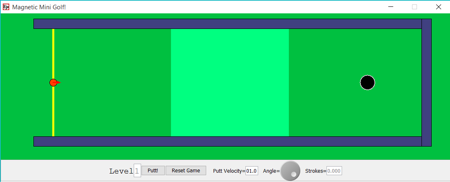
This program allows a player to play a version of Putt Putt with a twist: the ball behaves like a point charge in that it responds to magnetic fields. This game has two levels: regular and challenge. For the first level, the first magnetic field is placed in the lighter green region seen from the overhead view. The field is aimed into the ground (or screen). This causes the charged ball to veer in either a counterclockwise or clockwise direction depending on the direction of its approach to the field. The ball obeys the right hand rule, such that it will travel in a clockwise motion when approaching from the left and counterclockwise from the right. Level two adds a teal magnetic field in the opposite direction.

The ball's motion is also affected by friction with the green. This inhibited acceleration causes the ball to slow and eventually stop, as normal golf balls are wont to do.

The rules are simple. Putt the ball in the hole in as few strokes as possible!

Players may change a few factors, the velocity of the putt, the direction of the ball, and the original ball placement, in order to accomplish this goal. The velocity is controlled by the input field, and the angle by the dial. Enter must be pressed after changing the velocity. Both of these variables, however, can also be manipulated by the hot spot on the tip of the arrow after the first shot. (I prefered that players use the panel elements at least once.)

Once the player has selected the parameters, they can press the Putt button to hit the ball. There is a reset button in case things go too awry in a particular round.

The counter in the bottom right corner keeps track of the number of strokes. Note that if the ball leaves the green, the player will incur a penalty stroke!

]]>
DESCRIPTION_EDITOR Physics true false _default_ Physics false

The acceleration of the ball is calcuated by utilizing the force equation F=qv x B, used when a point charge interacts with a magnetic field. The cross product requires the right hand rule behavior of the ball. The magnetic contribution to the acceleration in the ODE is set so that it equals q*v*B/m only when in the specific light green region. The B value is negative in the teal region, reversing the direction.

Friction is added to the acceleration calculation with simply subtracting b*v/m, where b is a friction coefficient set to .5 in this simulation. I then wrote code to prevent the ball from infinitely approaching a zero velocity. The program sets the velocity of the ball to zero when its velocity slows to less than .05. It uses this information to allow the player to putt once more.

]]>
DESCRIPTION_EDITOR challenges true false _default_ challenges false

The example programs I  looked at were working with arrays, and I was not. I found it challenging at times just to use code specific to a single ball, oddly enough.

The theta dial turned out to be the biggest time sink in proportion to its importance in the program. It's settings were challenging for me to configure.

I also had trouble letting go of the idea that every program needs a for-loop, more or less.

The events' collisions were the most challenging aspect of the programming. I  had to be much more careful with that code and felt like what I was writing was often redundant. I would remove the repeated code only to find the program had ceased to work. That was frustrating, what with my gut saying something was wrong with my setup. The coding may be clunky in places, perhaps, but I wanted to stick to the functioning game.

]]>
20 1 false VARIABLE_EDITOR Visual Vars true false VARIABLE_EDITOR Dynamical Vars true false VARIABLE_EDITOR Constants true false VARIABLE_EDITOR varfrem true false CODE_EDITOR Init Page true false ODE_EDITOR Level 1 true false x1 && x EVENT_EDITOR Top Wall true false STATE_EVENT BISECTION 100 false 0 && distance EVENT_EDITOR Back Wall true false STATE_EVENT BISECTION 100 false 0 && distance EVENT_EDITOR Bottom Wall true false STATE_EVENT BISECTION 100 false EVENT_EDITOR Sunk true false STATE_EVENT BISECTION 100 false t dt vx ax vy ay RungeKutta 10000 0.00001 false false false false CODE_EDITOR StopBall true false CODE_EDITOR Dragging true false startx+.1 ) { //At the beginning of the game, ball may not be placed past start line _tools.showOkDialog("Illegal start! You may not start beyond the yellow line. Go back."); startLevel(); } if (x<-length/2){ //Ball must begin on the green _tools.showOkDialog("Don't be shy! Stay on the course, friend."); _reset(); } } if (strokes>0) { draggable=false; } ]]> CODE_EDITOR Out of Bounds true false CODE_EDITOR 2nd B field true false LIBRARY_EDITOR startlevel true false LIBRARY_EDITOR Hole Position true false LIBRARY_EDITOR BField true false x1 && xp LIBRARY_EDITOR 2ndBField true false x3 && xp LIBRARY_EDITOR OutofBounds true false 0 && x<-length/2) { _view.alert("Out of Bounds","Golly!","You lost your ball. That's 1 Penalty Stroke. Try again!"); x=startx; y=width/2; vx=0.0; vy=0.0; theta=0.0; strokes+=1; _view.arrow.setVisible(true); } } ]]> LIBRARY_EDITOR Passed Level true false LIBRARY_EDITOR fullscreen true false HTML_VIEW_EDITOR HtmlView Page true false 0 0 0 800 600 true true Elements.Panel Elements.Button Elements.Button Elements.Label Elements.Slider Elements.Label Elements.Slider true Elements.Panel true Elements.PlottingPanel Elements.Shape2D Elements.Shape2D Elements.Shape2D Elements.Shape2D Elements.Shape2D Elements.Shape2D Elements.Shape2D Elements.Shape2D Elements.Arrow2D